

📶 Error Code 2 on Login, Fixed When Switching to Mobile Data: The Wi-Fi Captive Portal Trap Explained
If you try to log into Facebook and repeatedly encounter Error Code 2, only to see the problem disappear instantly the moment you switch to mobile data, you are almost certainly caught in a Wi-Fi captive portal trap. This is not a Facebook bug, not an account restriction, and not a coincidence. It is a well-documented network behavior that appears frequently in advanced troubleshooting discussions, including cases shared within the Apple Support Community 📱🌐.
What makes this issue particularly deceptive is that the Wi-Fi connection looks healthy. The device shows full signal strength, other apps may appear to work, and basic websites might even load. Yet Facebook login fails consistently and predictably, creating the illusion that something is wrong with your account. In reality, the network itself is silently interfering with secure authentication.
🔍 Definition: What Is a Wi-Fi Captive Portal Trap?
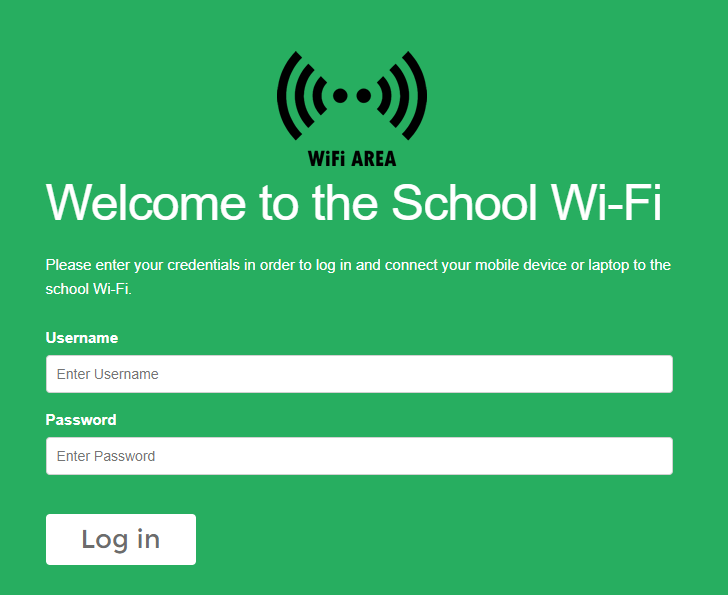
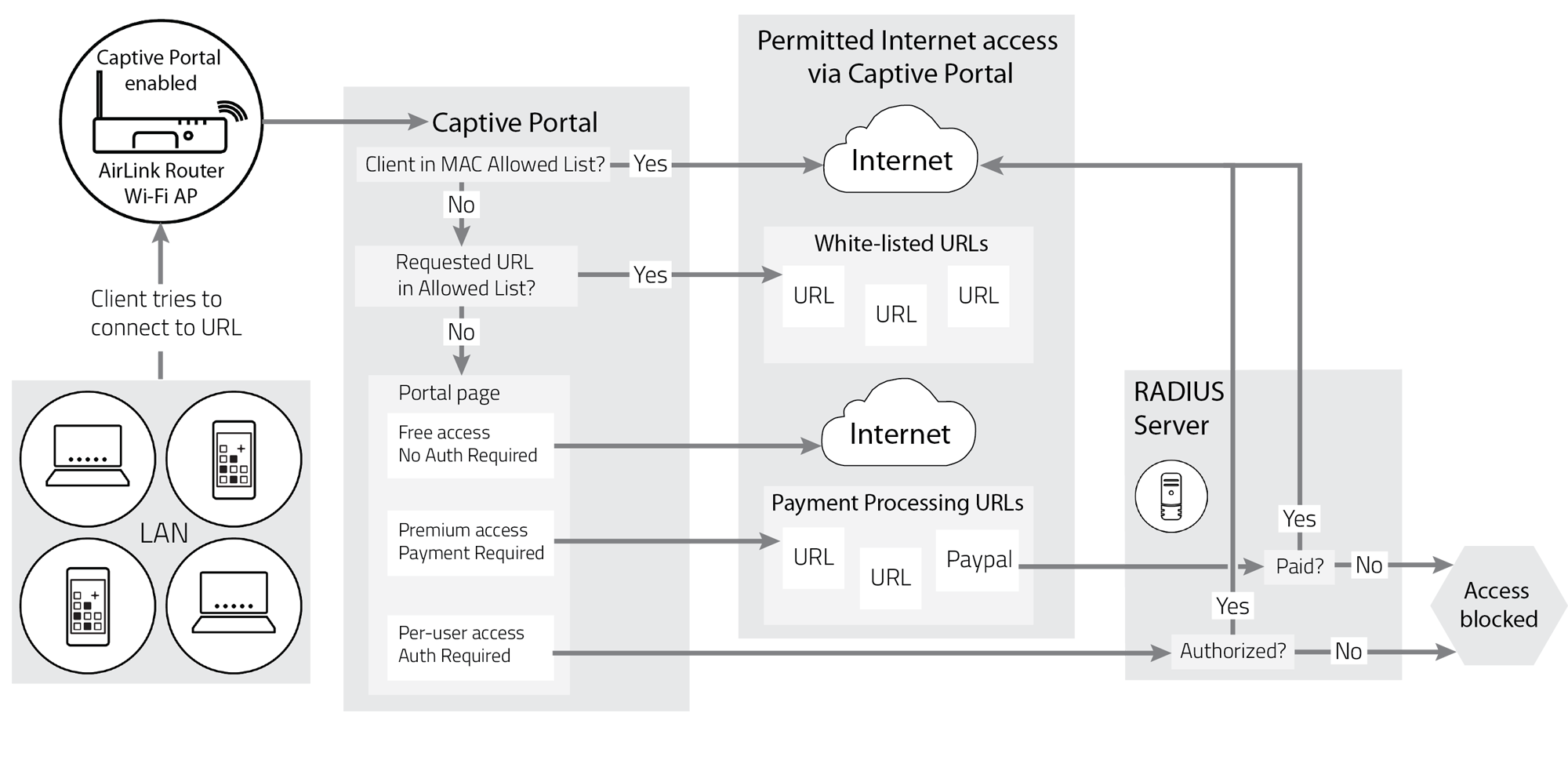
A captive portal is a network mechanism commonly used on public, hotel, office, café, airport, and campus Wi-Fi networks. Before granting full internet access, the network intercepts traffic and redirects the user to a login page, terms acceptance screen, or authentication form.
A captive portal trap occurs when the network partially allows internet access but still intercepts or modifies certain types of traffic, especially encrypted HTTPS connections. Your device believes it is online, but the network has not fully released it. As a result, secure apps like Facebook attempt to establish trusted connections and fail immediately, because the network responds in an unexpected way 🧩.
📌 Why Error Code 2 Appears Specifically in This Scenario
Facebook Error Code 2 is triggered when the app cannot securely establish a trusted session with Facebook servers. Captive portals interfere at exactly this stage.
When Facebook sends a secure login request, the captive portal either redirects it, blocks it, or injects a response that does not match Facebook’s expected certificate and endpoint identity. Facebook detects this mismatch instantly and aborts the login process, surfacing Error Code 2 instead of proceeding insecurely.
The reason switching to mobile data fixes the issue immediately is simple: mobile data bypasses the captive portal entirely. The app finally reaches Facebook servers without interference, and login succeeds instantly ⚠️.
🧠 How Captive Portals Create the Illusion of a Facebook Problem
Captive portals are designed primarily for browsers, not apps. They expect the user to open a web page, see a login or acceptance screen, and complete the process manually. Many apps never trigger this screen, especially if the network incorrectly reports itself as “connected.”
As a result, the portal remains active in the background, silently intercepting traffic. Basic apps may still function because their traffic is cached, unencrypted, or tolerant of redirects. Facebook is not. Its authentication flow is strict, encrypted, and intolerant of interception. That strictness is what exposes the problem 😶🌫️.

🛠️ How to Detect a Wi-Fi Captive Portal Trap Reliably
The clearest diagnostic signal is instant resolution on mobile data. If Error Code 2 appears every time on Wi-Fi and disappears the moment mobile data is enabled, the network path is the problem, not the app.
Another strong indicator is behavior across apps. Secure apps such as banking apps, corporate email clients, or VPNs may also fail on the same Wi-Fi, while casual browsing appears normal.
A simple test is to open a browser and navigate to a non-HTTPS address such as a generic test site. If a login or acceptance page suddenly appears, the captive portal is confirmed. Until that page is completed, Facebook will continue to fail 🧪.
📊 A Real-World Scenario Seen Repeatedly
This exact pattern appears repeatedly in user reports on the Apple Support Community. iPhone users connect to hotel or workplace Wi-Fi, Facebook login fails with Error Code 2, and switching to cellular data fixes it instantly. In nearly all cases, the underlying cause is an incomplete captive portal session that never fully released the device.
Once users opened Safari, completed the portal login, or disconnected and reconnected properly, Facebook began working on Wi-Fi without any changes to the app or account. The issue resolved itself not because Facebook was fixed, but because the network finally stopped interfering 😊.
📈 A Metaphor That Makes the Trap Obvious
Imagine being allowed into a building lobby but stopped by a guard before reaching the elevator. You can walk around, talk to people, and look busy, but you cannot reach your destination. Mobile data lets you enter through a different door entirely. Facebook Error Code 2 is simply the elevator refusing to move because the guard never waved you through 🚪🛑.


❓ Frequently Asked Questions (FAQ)
- Why does Facebook show Error Code 2 only on Wi-Fi?
Because the Wi-Fi network is intercepting secure traffic. - Is my Facebook account restricted?
No, account issues do not resolve instantly on mobile data. - Why do some websites still load?
They may be cached or less strict about redirects. - Do captive portals affect apps differently than browsers?
Yes, they are designed mainly for browsers. - Why doesn’t Facebook show a clearer error?
For security reasons, it avoids revealing network details. - Does reconnecting to Wi-Fi help?
Sometimes, if it triggers the portal correctly. - Can VPNs bypass this issue?
Yes, but many captive portals block VPNs until login. - Is this common on hotel Wi-Fi?
Extremely common. - Does resetting the router help?
Only if you control the network. - Is this dangerous?
Not inherently, but it is insecure until resolved.
🤔 People Also Ask
Why does Facebook work on cellular but not Wi-Fi?
Because cellular networks do not use captive portals.
Can captive portals break secure apps?
Yes, especially those using strict TLS validation.
Why doesn’t the login page show automatically?
Because the network fails to trigger it correctly.
Is this an iPhone-only issue?
No, it affects Android and iOS alike.
Should I avoid public Wi-Fi for logins?
Yes, especially before completing portal authentication.
✅ Final Thoughts
When Facebook shows Error Code 2 on login, yet works flawlessly the moment you switch to mobile data, the behavior is not mysterious and it is not random. A Wi-Fi captive portal trap is silently intercepting your connection, preventing Facebook from establishing a trusted session. Once you recognize this pattern, the fix becomes straightforward: complete the captive portal authentication, change networks, or temporarily rely on mobile data. Facebook was never broken. It was simply refusing to talk through a network that had not fully let you through 😌📶.
You should also read these…
- axtly.com – the science behind why spinner wheels are so addic
- huesly.com – random name generator tips for finding perfect nam
- beofme.com – how to improve your sleep hygiene naturally
- beofme.com – healthy snack ideas to balance blood sugar levels
- tugmen.com – twitter x restricted country content warnings regi
- tugmen.com – finding low%e2%80%91interest personal loans for st
- closedad.com – best party games you can play with a spin wheel
- axtly.com – herbal tea recipes to support immune health
- surgeblog.com – content isnt available on facebook side effects of
- axtly.com – high quality power take off pto solutions for heav

